There are fewer parking spaces than employees with cars. The system allocates them by your rules: booking from the app, together with a desk or by asking the AI agent, assigned spaces for those entitled to them, and guest entries — while security sees who is due to arrive and in which car.
Employees don’t open a separate system for the car. Parking is booked in the mobile app, in the web app, with one switch together with a desk — or simply by asking the AI assistant: “book me a desk and parking for Friday”.
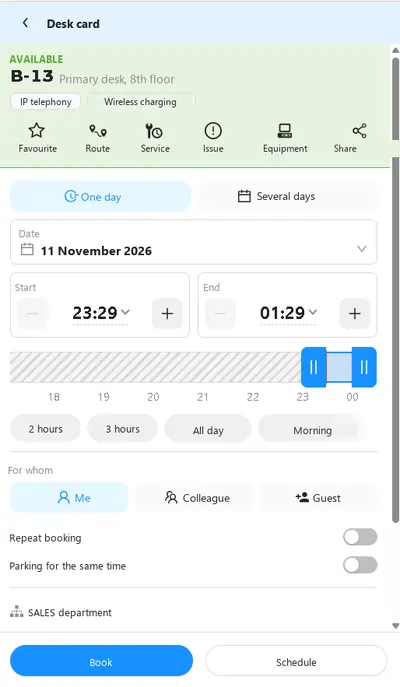
The desk card has a “Parking for the same time” switch. If the employee is entitled to parking, it is booked for the same hours without a second step.
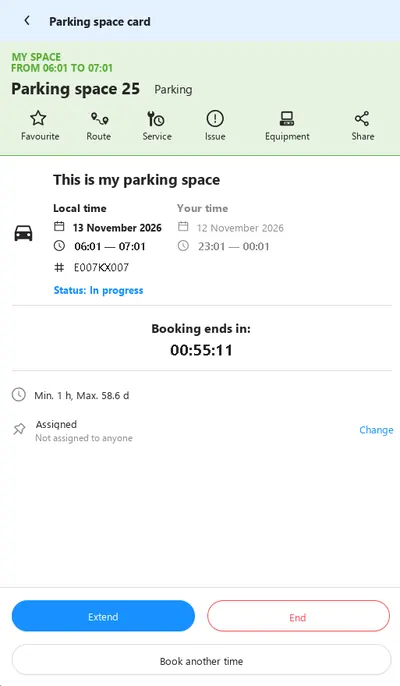
Running late — extend the booking from your phone. Leaving early — end it, and the space is immediately free for others. A timer shows how much time is left.
“Find a free parking space tomorrow from 9 to 6” — the agent picks a space according to company rules. Your corporate assistant connects through the MCP server.
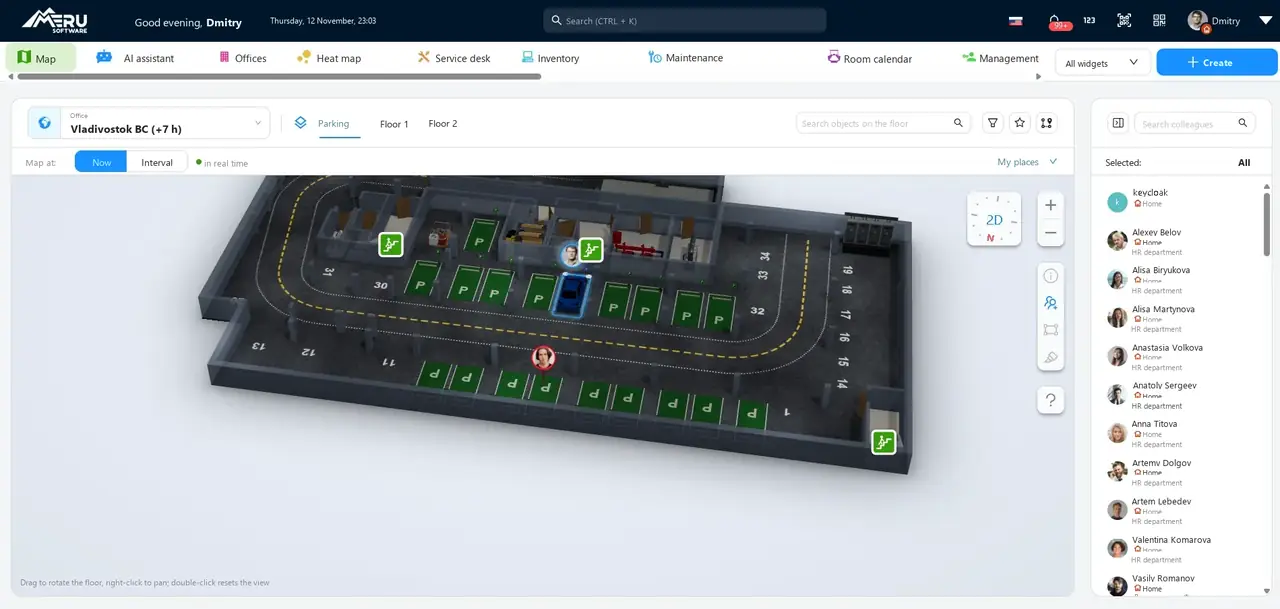
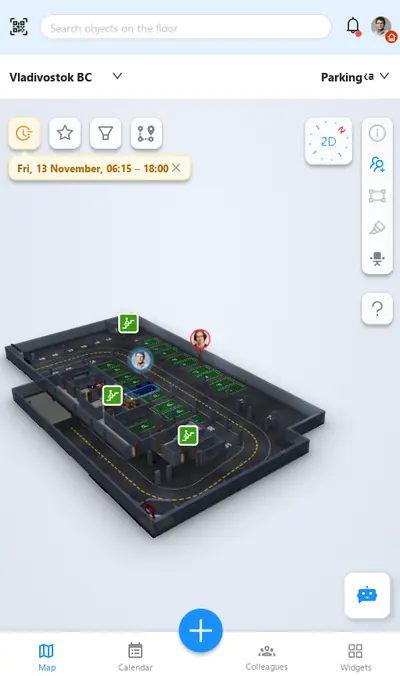
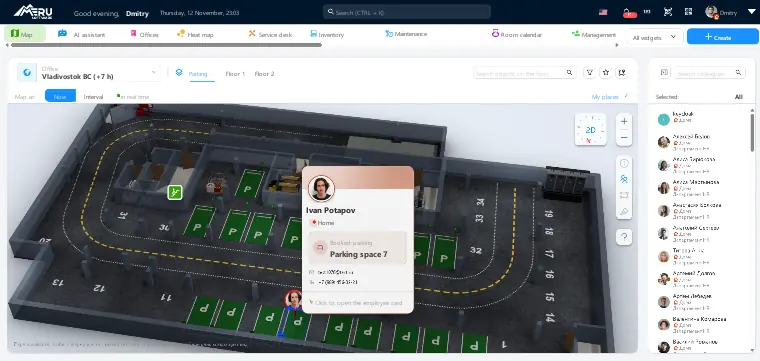
Parking is just another floor on the same 3D map as the office. Spaces are numbered, statuses update in real time, and every driver on the plan has a card with their booking.
An assigned space that stands empty half the week is the most expensive part of a car park. The system keeps privileges in place without keeping spaces empty.
A space is assigned to one employee or several. The company decides: anyone may book it, anyone with a warning, or only the assigned drivers.
When the owner is on holiday or working from home, their space is available to colleagues for those days. The owner’s own bookings are created and confirmed automatically.
An employee books a space for a guest or contractor for the time of the meeting. Guest bookings can be approved and confirmed automatically.
Make choosing a car mandatory — and no booking is created without a plate number. Security and the recognition system know which car to expect.
An employee delegates booking rights to an assistant, who manages the manager’s parking on their behalf.
Recurring bookings “every Tuesday and Thursday” — separately for employees and guests. Leave cancels them for its dates.
Configured for any parking rules. Default booking times and time step, minimum and maximum duration, how far ahead in minutes or working days, approval by a manager — for all bookings or only long ones, automatic release of unconfirmed bookings, space and user groups, a limit of assigned drivers per space. Everything is set by parameters, with no custom development.
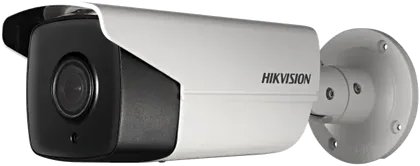
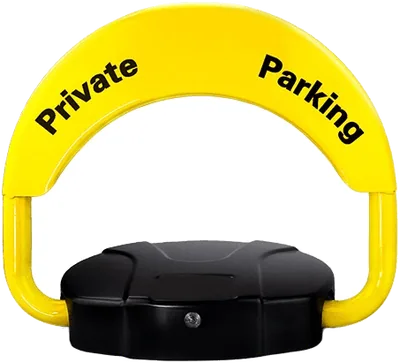
Two devices integrated with Merusoft turn a booking into physical access: the camera at the entrance recognises the car and opens the barrier, and the blocker opens the space only for the person who booked it.
Until a booking is confirmed, the space isn’t really taken. The confirmation method is chosen to suit your entrance — from a button in the app to automatic plate recognition.
Bookings and confirmed entries add up to an occupancy report by hour, weekday and department. You see whether there are enough spaces on peak days, how many assigned spaces stand empty, and whether to rent more — or give some up.
Parking is a module of the Merusoft SmartOffice platform, working together with desk booking, meeting rooms, requests and access. To assess the occupancy of the whole office, see the office space usage audit.
The platform runs in companies with a distributed structure, their own information security teams and strict infrastructure requirements.




Spaces are not assigned forever but booked for the hours or days needed under company rules: booking limits, how far ahead, group priorities. Assigned spaces stay with those entitled to them but are available to colleagues on days the owner is away.
Yes. A space is assigned to one or several employees, and the company chooses: anyone may book it, anyone with a warning, or only the assigned drivers. The owner’s own booking is confirmed automatically.
Choosing a car can be made mandatory, so every booking has a plate number. Security sees the list of expected cars in its terminal and confirms entry; with plate recognition a booked car drives in automatically.
An employee or guest books entry and gives the plate number. A Hikvision plate recognition camera integrated with Merusoft recognises the car at the entrance, the barrier opens automatically, and the booking is confirmed on entry — from booking to space with no passes, calls or stopping at the barrier.
The blocker contains a Merusoft module linked to the booking system. The arm stays up while there is no booking for the space. The booking owner opens it with a button in the mobile app — for everyone else the command does not work. A sensor in the device detects whether a car is in the space: the booking is confirmed on arrival and the space is released after departure.
Yes, with the IWMS module for property managers: parking is charged at the business centre’s tariffs — guest entries, hourly and season parking for tenants, with charges included in settlements.
A booking needs confirmation: in the app, by QR code, NFC/Bluetooth, via the security terminal or automatically at the entrance. Without confirmation in the set time, the booking is cancelled and the space returns to the shared pool.
No. Parking is a module of the Merusoft SmartOffice platform: the same mobile app, web app and 3D map as for desks and meeting rooms. Parking can be booked with one switch together with a desk.
A demo takes 40 minutes: we book a space from a phone and together with a desk, show the 3D parking map, assigned and guest spaces and confirmation at the entrance — on your car park scenario.