Merusoft
Phone: +7 495 545-32-84 info@merusoft.ru
RU EN AR
Products/ Smart Lockers and Storage Rooms/ For the corporate office
Smart lockers for the corporate office

Personal belongings and documents locked up at the office, not in a bag or on a desk

A locker is assigned to an employee permanently or issued for a period — in any of the company's offices, on the floor they need, in the corporate gym. It opens with a phone, a PIN, a QR code or an access card. Documents can be left for a colleague, and a courier can drop a delivery into a locker: no keys, no reception desk, no tickets to facilities.

Start a pilot on one locker bank → Request a demo
4
ways to open: phone, PIN, QR, access card
24/7
access, including when the connection drops
0
keys, duplicates and tickets to facilities
1
system for every office, floor and the gym
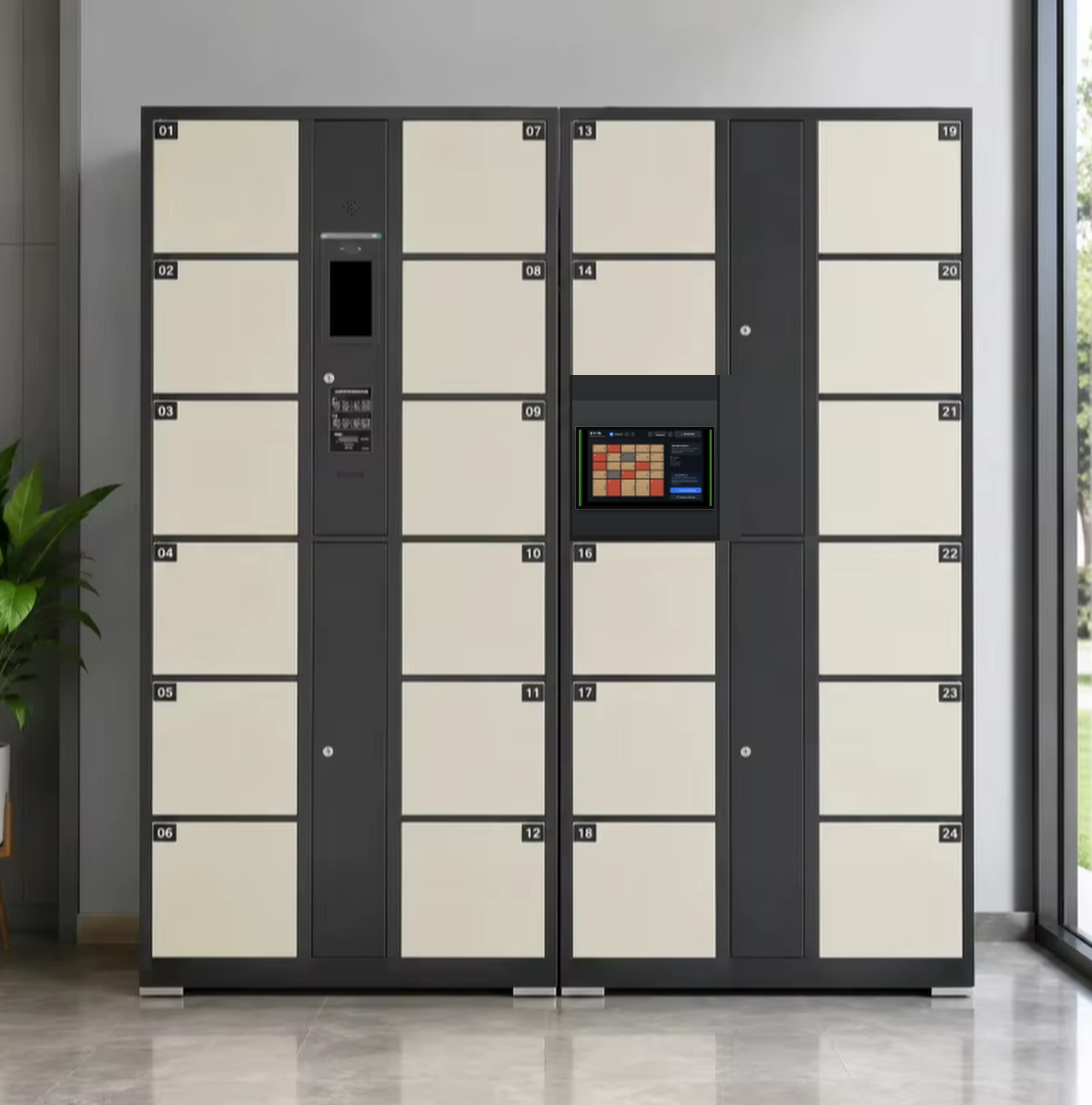
A locker bank with a Merusoft kiosk tablet in the office
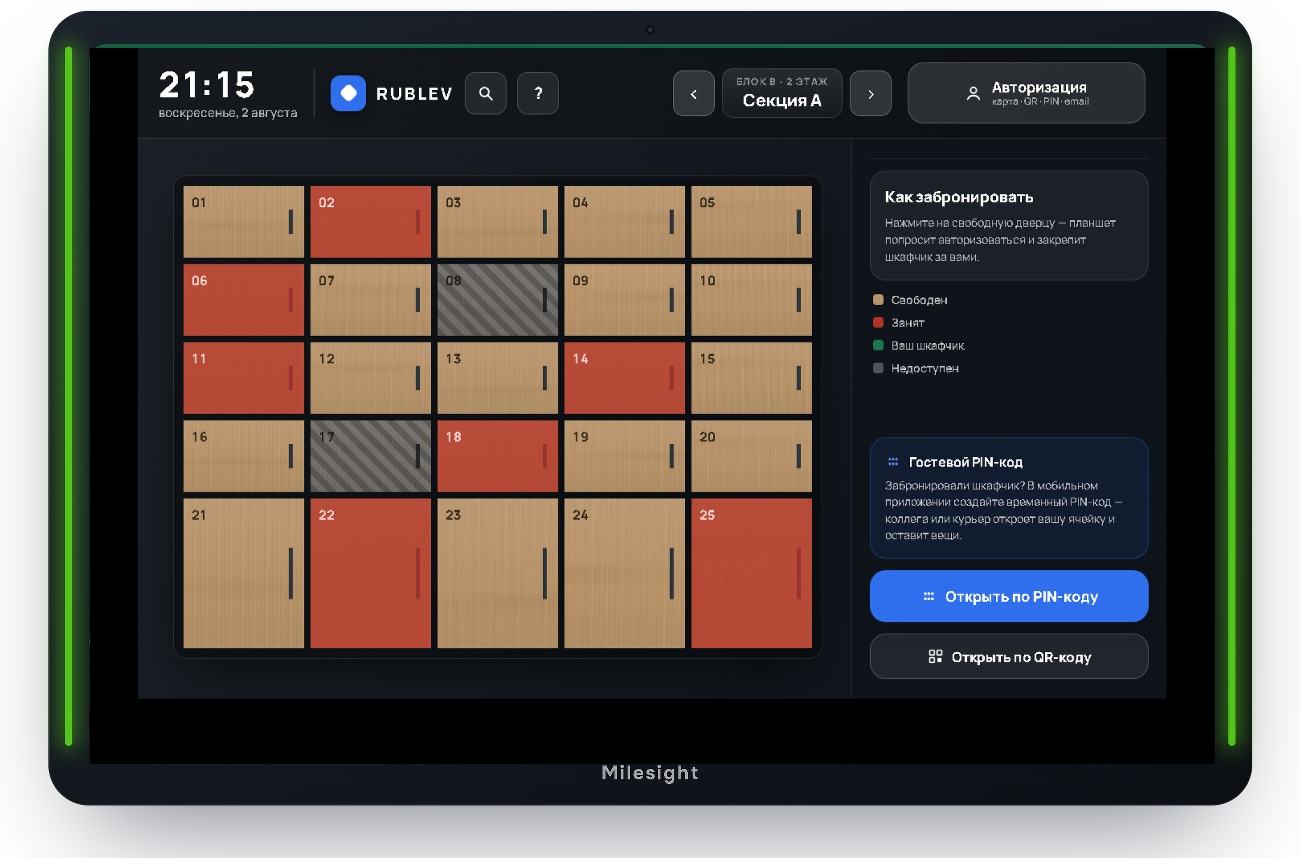
The tablet by the locker bank: locker map, statuses and opening by card, QR or PIN
The problem

The office became flexible; storage did not — still keys, spreadsheets and a pedestal by the desk

People come in only on some days, no desk is assigned to them, and archive and storage rooms have been cut back. Yet the laptop, the documents, the gym kit and the personal items have not gone anywhere — there is simply nowhere safe to put them. Every role sees this problem from a different angle.

On average 3 of 5 of 5 working days a hybrid employee spends in the office — JLL, 2025 68% of hybrid employees now value the quality of the workplace more than before — CBRE up to ×2 fewer lockers are needed with flexible allocation — workplace management research
Employee

Carries the office around in a bag

Laptop, charger, headset, a folder of documents, gym kit. On an office day, half the effort goes into finding somewhere to put it all — and then into not leaving it unattended after lunch.

Facilities and office management

Keys, lists and lockers of people who left

Issuing and collecting keys, duplicates, forced openings, arguments about who took whose locker. The occupancy spreadsheet is out of date within a week, and some lockers have been assigned for years to people who left long ago.

HR

The office has to be more convenient than home

Mandating attendance is easier than making the trip worth it. Everyday details — where to put your things, where to change after cycling in, how to receive a delivery — shape attitudes to the office more than any policy does.

Information security

Documents spend the night on desks

A clear-desk policy does not work if no desk is assigned and there is nothing to lock. Who opened a locker and what was inside cannot be reconstructed: a mechanical key keeps no log.

The solution

Belongings get a secure place in the office — and it works even when the employee is not there

The locker stops being a metal box with a key and becomes a service: the company gives people secure storage and a way to hand things over without matching anyone's calendar.

01

Belongings and documents stay at the office

Laptop, dock, folders, a change of clothes, an umbrella. People can come in empty-handed, and confidential paperwork does not travel across town in a backpack.

02

Hand over to a colleague without meeting

Originals, the company stamp, equipment: put them in a locker and send the code to the recipient. Your colleague collects them whenever they come in — even if you are working from home that day.

03

A courier leaves it in a locker

Documents from a counterparty, an order, a parcel: the courier opens a locker with a single-use code and leaves. Reception does not turn into a storeroom and nothing goes missing.

04

One access for every location

Your own locker on your floor, a locker in another company office for the length of a visit, a locker in the corporate gym — all in one app and on one badge.

How lockers are assigned

A permanent locker, a locker for a period, or a shared pool — the company chooses the mode, not the system

Rules are set per group of lockers and can be mixed within one bank. Sharing is only one of the options: if people need assigned lockers, the lockers stay assigned — just without keys, duplicates and manual bookkeeping.

Permanent

A locker of one's own

The locker is assigned as before, but it opens with a phone or a badge — no more keys to issue or lose.

  • Keys, duplicates and sign-out sheets disappear
  • An up-to-date list of assignments lives in the system, not a spreadsheet
  • When someone leaves, access is revoked with their badge
For a period

A locker for a visit, a project or a probation period

For a colleague from another city, a contractor, a new hire, a project member — access for exactly as long as needed.

  • Works in any company office the person travels to
  • The term is set in advance; extending takes one tap
  • When the term ends the locker returns to the pool; forgotten items show up in a report
Option · shared pool

A free locker where that suits better

For the gym, flexible-desk zones or shift teams, lockers need not be assigned at all: people take a free one and release it when they leave.

  • Enabled selectively, for specific groups of lockers
  • Free lockers are visible in the app and on the tablet by the cabinet
  • The same number of lockers serves more people
Access

Open it however you like: phone, PIN, QR or access card

All methods work at once — people choose, rather than adapting to the system. Phone dead or left in the car? There is a kiosk tablet next to the cabinet, and the work badge in your pocket.

Smartphone

Opening straight from the app — which also shows the locker, its term and the access history.

PIN on the tablet

A kiosk tablet by the locker bank: enter the code and the locker opens. No phone needed.

QR code

Permanent or single-use — easy to send to a colleague, a courier or a contractor.

Access card

The standard work badge: nothing extra to issue or configure.

Works offline — when the connection drops, card and PIN access keeps working
Access log — you can see who opened a locker and when
Guest codes — single-use, for a courier or a contractor
9:41Merusoft
My locker
Locker A-24 · assigned
Dorozhnaya office, 7th floor, bank by the lifts
Access PIN
3 5 8 1 4 0
Employee access QR code
QR for the tablet by the locker bank
Open locker
Share access with a colleague
The employee screen: their locker, PIN and QR, opening and sharing access with a colleague — no need to contact facilities
Where lockers go

Different offices, different floors, the corporate gym — one system, one access

Each locker bank belongs to its location, while the rules, the app and the reporting are shared: an employee sees only the lockers they have access to, and facilities manage every bank from one place.

01

Your own floor

A bank by the lifts or in the break area: laptop, documents, personal items. The locker sits close to where the person usually works.

02

Other company offices

Travelling to another office or city, the person gets a locker for the duration of the visit. No separate request, no local administrator.

03

The corporate gym

Lockers in the changing room work on the same badge, usually from a shared pool: take a free one for the workout, release it on the way out.

04

Deliveries and handovers

Lockers by the entrance: a courier drops off with a guest code, a colleague collects with their own. Reception and security are out of the loop.

05

IT equipment handout

IT puts a laptop, a headset or a loaner device into a locker and sends the code to the recipient. No meeting, no signature — and the opening is in the log.

06

Shifts, workwear, sports gear

Shift teams, workwear and tools, cycling helmets and a change of shoes: tall lockers near the showers or the entrance from the car park.

Facilities, security, analytics

Every opening in the log, every locker in the occupancy report

Security can see who opened a locker and when, so disputes are settled with facts rather than by asking around. Facilities stop collecting data by hand: occupancy by office, floor, bank and locker size is calculated automatically.

  • Assigned but unopened lockers — you can see what can go back into the pool
  • Access driven by HR data — leaving the company closes the locker automatically
  • A case for the purchase — how many lockers, and in which sizes, are actually needed

Together with the office utilisation audit locker data joins the bigger picture: desk, meeting room and storage usage are measured by the same method.

Locker occupancy by location
Last month · 4 banks, 212 lockers
Dorozhnaya office, 7th floor
94%
Dorozhnaya office, 5th floor
61%
Gym, changing room
78%
Leningradsky office
37%
18
lockers assigned but not opened for 60 days
6
lockers still held by former employees
100%
of openings logged with the person and the time
Turnkey solution

Your cabinets stay where they are — the locks, the controller and the software make them smart

Most offices already have the furniture, and there is no reason to replace it: wireless locks fit existing doors with no cabling. If a new bank is needed, we supply the whole thing.

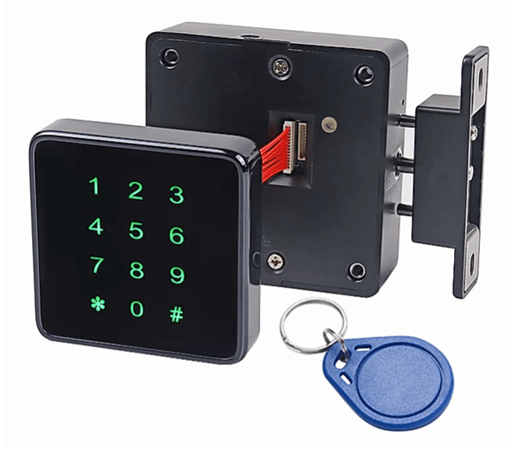
Wireless electronic locker lock

Wireless lock

Bluetooth and RFID, battery powered. Fits existing lockers without wiring — a bank is converted in a single evening. 500,000 cycles, response under 0.5 s.

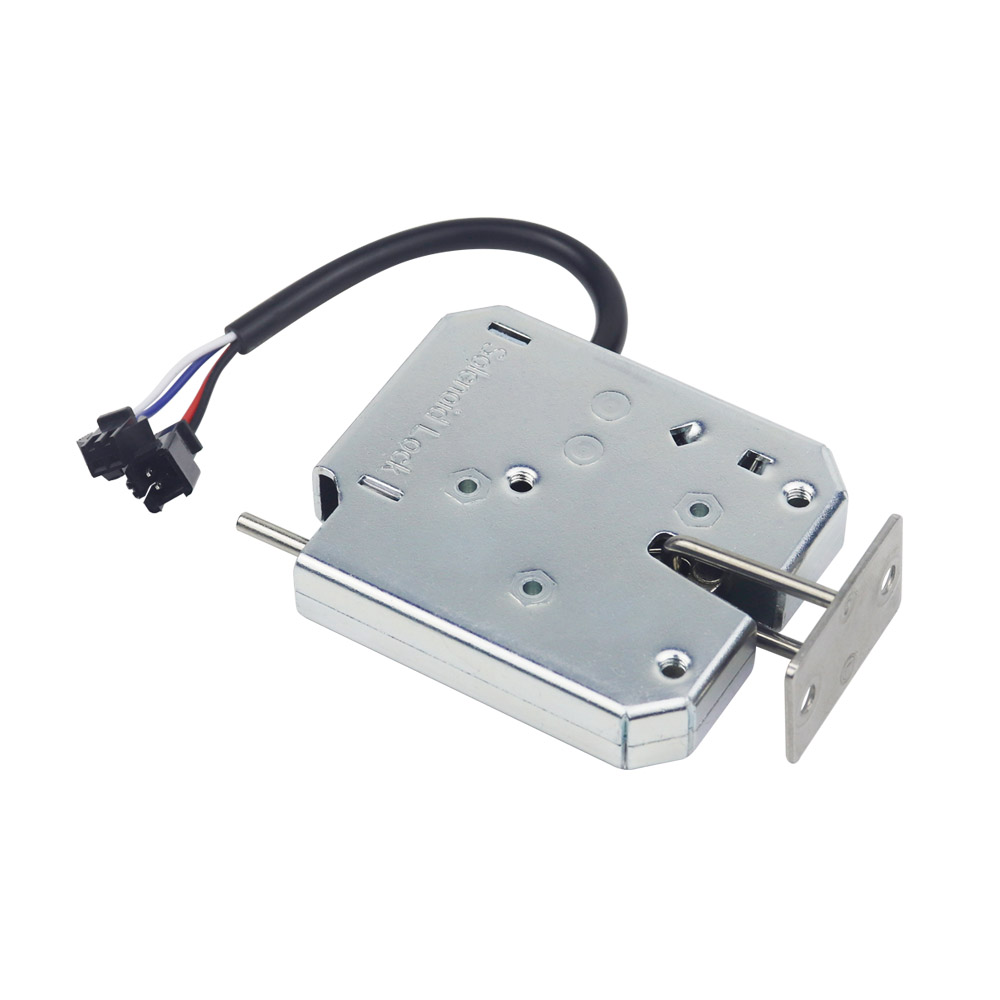
Wired motor lock for cabinets and storage modules

Wired motor lock

Electromechanical bolt, 12/24 V, steel body. For new banks, heavy-duty lockers and cabinets with power run to them.

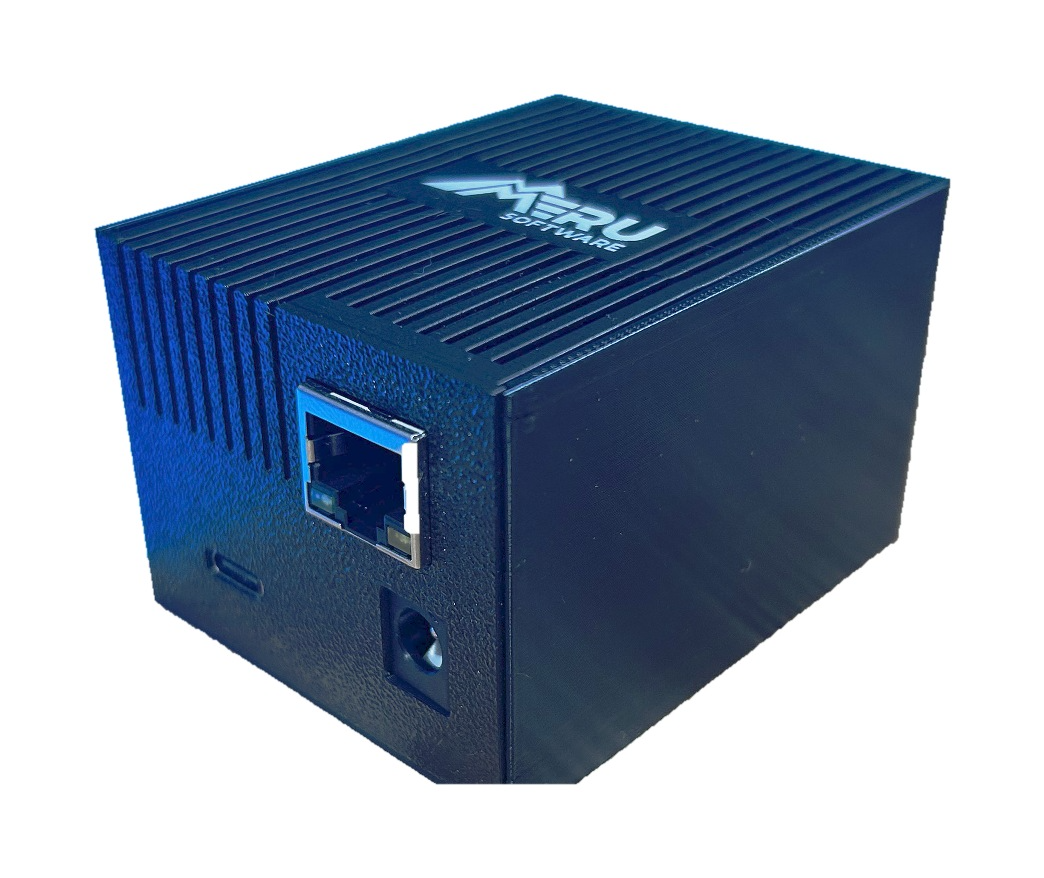
Merusoft access controller

Access controller

Our own device: drives a group of locks, works offline when the connection drops, reports events to the system.

Tablet by the locker bank with the locker management interface

Tablet by the cabinet

Kiosk mode: locker map and statuses, take a free locker on the spot, sign in by card, QR, PIN or email. Works offline.

Retrofit instead of buying. You can start with one bank of existing lockers: locks, a controller, a tablet — and the same furniture already runs on the system's rules. No need to replace cabinets.
Ecosystem

Part of the Merusoft SmartOffice platform

Lockers live in the same system where people book desks and meeting rooms: one employee directory, one badge, one app and shared workplace analytics.

SmartOfficeWorkplace management platform — shared rules, roles and reporting
ManagementManage the locker from the mobile app or the tablet by the locker bank
AccessPIN, QR and the access badge; access is revoked when someone leaves
AuditOffice utilisation audit — locker occupancy within the wider office picture
FAQ

Frequently asked questions

Do lockers have to be moved into a shared pool?+

No. Permanent assignment is a full-fledged mode: the locker stays personal, only the way it is opened and tracked changes. A shared pool is an option for specific groups of lockers, for example in the gym or in flexible-desk areas.

Do existing lockers have to be replaced?+

No. Wireless locks are installed on the furniture you have with no cabling — an existing bank is brought into the system in a single visit. New cabinets are only needed if there are physically too few lockers.

How do I hand documents to a colleague or receive a delivery?+

The locker holder sends the recipient a code or a QR — to an employee's account, or as single-use guest access for a courier or contractor. Every opening is recorded: you can see who put something in and who took it out.

What if someone forgets their phone?+

The access methods work in parallel: access card, PIN, QR or email on the tablet by the cabinet. One is enough — the no-smartphone scenario works end to end.

What happens when an employee leaves?+

Access is revoked together with the badge, based on HR data. The locker goes into a report for checking and returns to the pool. There are no key duplicates to chase, because there are no keys.

What happens if the internet goes down?+

The controller and the tablet keep working offline: card and PIN access continues, events are stored locally and sync once the connection is back.

A pilot on one locker bank

We start with one bank in your office: fit locks to the existing lockers, connect the tablet and the app, and after a month look at the log and the occupancy — then decide how to scale across floors, offices and the gym.

  • A survey: how many lockers you have now and how they are used
  • Retrofit of existing furniture — no new cabinets to buy
  • Configuring the modes: assigned lockers, issue for a period, shared pool
  • Access log and occupancy report for the pilot period

By submitting this form you agree to our privacy policy. We will get back to you within one business day.